
If you’re using a Statrys account with DBS Hong Kong and Stripe has suddenly started failing your payouts, you’re not alone.
We lost days chasing this down, because Statrys’ support on WhatsApp, nobody bothers replying to.
Stripe payments had worked fine for several years, and then out of the blue, we got this.
A recent payout to your connected bank account failed, and your Stripe balance has been adjusted to reflect the failure of this payout attempt.
Since future payouts are likely to also fail, we won’t be able to make any further payouts to or from your bank account until this is fixed.
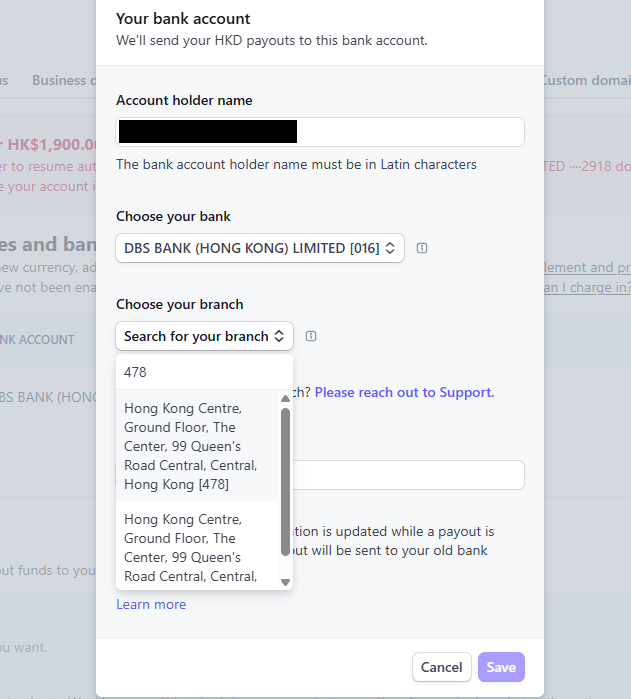
Everything was working fine before, so off you go to the Stripe dashboard and Stripe asks you to confirm:
- Bank code
- Branch code
- Account number
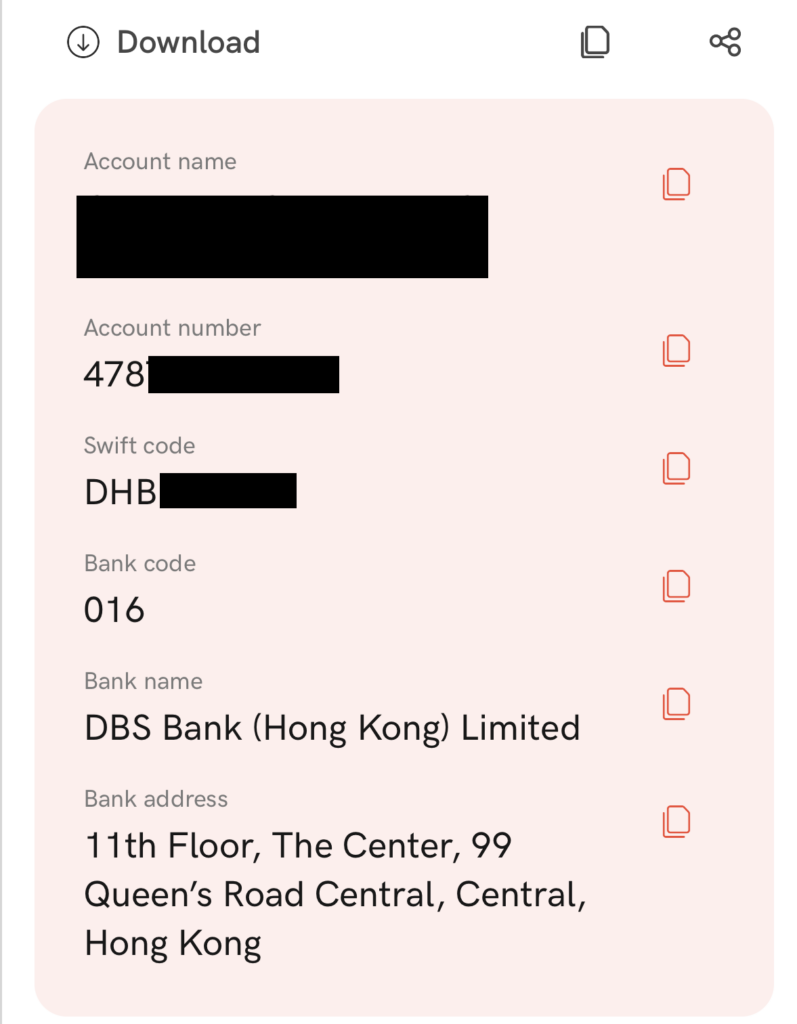
Statrys, meanwhile, gives you a bank code, a SWIFT code that Stripe doesn’t use, one account number and no further explanation. So you have no branch code.
That’s where the problem starts.
The Thing Most People Miss
Bank code and branch code are not the same thing.
In Hong Kong:
- Bank code identifies the bank, for Statrys DBS accounts, this is usually 016
- Branch code identifies the specific branch
Stripe requires both. There is a drop-down where the branch code is listed alongside the address. In this case, 478.
Statrys does not show them separately.
What Statrys Actually Gives You
Statrys presents your account like this:
Account number: 4XXXXXXXXXXX (probably 12 numbers)
Looks like a single number.
It isn’t.
That number is actually:
- First 3 digits: branch code
- Remaining digits: account number
Statrys simply doesn’t label it that way.
How the Hong Kong Clearing Format Works
Local HKD payments follow this structure:
Bank code – Branch code – Account number
So your details should be understood as:
- Bank code: from the bank, for DBS this is 016
- Branch code: first 3 digits of your number
- Account number: everything after that – normally nine numbers
Where Stripe Trips You Up With Statrys Numbers
Stripe asks for:
- Bank (DBS)
- Branch (dropdown list)
- Account number (separate field)
The mistake is obvious once you see it.
Don’t paste the full Statrys number into the account field.
So you end up with:
Bank: 016
Branch: 4XX
Account: 4XXXXXXXXXXX
That’s wrong.
You’ve included the branch code twice.
The account no longer exists, so the bank rejects the payout.
The Statrys Address Mismatch, Ignore It
Stripe might show:
Ground Floor, The Center
Statrys might show:
11th Floor, The Center
Same building.
This is irrelevant.
Hong Kong payments are routed using codes, not addresses.
The Fix
Split the number properly:
- Bank code: 016
- Branch code: first 3 digits
- Account number: everything after the first 3 digits
Do not include the branch code in the account number field.
Why This Suddenly Broke
Stripe appears to have tightened validation.
Previously, it would accept the combined number.
Now it expects the proper Hong Kong clearing format.
Quick Checklist
- Bank code is correct for your bank
- Branch code = first 3 digits
- Account number = remaining digits
- No duplication
Final Word
If your account number starts with something like:
4XX…
That’s not just an account number.
It’s:
- 4XX = branch
- The rest = your account
Split it properly, and Stripe payouts should start working again. And your money should flow once again into your Hong Kong coffers.
If this has helped you, or you’ve run into a similar issue, feel free to use the comment box below.